
F-12-828 Request to Add New Physician
🎯 PURPOSE
Describes the process how clinicians may request new physicians or non-physician practitioner (NPP) to be added to the HCHB database. Clinician must complete a selective refresh once receiving confirmation that the physician /NPP has been added.
🔄 PROCESS
If clinician requires physician/NPP to be added immediately/urgently, they must call the office to speak with Intake/Business Manager. If not an urgent request, clinician may complete the steps below to enter a coordination note.
NOTE: Coordination notes that are entered from within a visit will not sync to the back office until the visit is completed and synced.
- Refer to O-12-823 Create Coordination Notes in PointCare for detailed instructions on how to create a Coordination Note outside of a visit or within a visit.
-
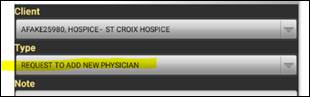
Select Note Type: REQUEST TO ADD NEW PHYSICIAN:
-
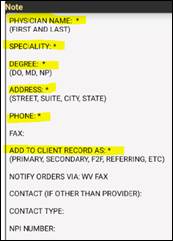
Add required details to assist office in setting up correct provider.
-
-
Save and Sync.
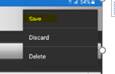
- Coordination note will route to Medical Records Specialist to add new physician to HCHB database.
📅 Effective: 05.30.2023 | 🛠️ Revised: 10.29.2026 | ✅ Approved: JS