
F-12-820 Create CLINICALLY SIGNIFICANT MEDICATION ISSUE Coordination Note
🎯 PURPOSE
Entered by a clinician in PointCare to document clinically significant medication issues and the follow up completed by the field clinician. Clinician should also use this note type to document follow-up completed outside of the visit.
PointCare users can create the note manually within a visit note or the medical record, but they will also be prompted to complete the note if they answer “Yes” to the following OASIS item:

This pop-up will appear when "Yes" is selected:

🔄 PROCESS
Refer to F-12-823 Create Coordination Note in PointCare for detailed steps on how to create a coordination note in PointCare.
-
Select CLINICALLY SIGNIFICANT MEDICATION ISSUE note:

- Complete template:
- The clinician shall complete a Clinically Significant Medication Issue coordination note upon identification of the medication issue and notification of the provider. If a provider response is obtained during the initial notification, all communication, recommendations, and resulting orders may be documented within the same coordination note.
-
If the provider response is received after the initial coordination note has been completed or after the original documentation has been transmitted to the office, the clinician shall create a new Clinically Significant Medication Issue coordination note to document the follow-up communication, provider response, and any resulting orders or interventions. Both coordination notes shall be maintained as part of the client's permanent medical record and serve as documentation of the agency's identification, reporting, and resolution of the clinically significant medication issue.
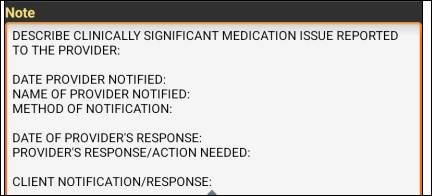
Coordination Note Template
Example A

Example B

-
Select the Menu icon in upper right corner:

-
Select Save:

- Sync the Coordination Note back to the office.

📅 Effective: 06.16.2026 | 🛠️ Revised: 10.29.2026 | ✅ Approved: JS