
F-12-138 Remove Duplicate Visits in Pointcare
🎯 PURPOSE
If a clinician identifies there are multiple duplicate visits on the PointCare device, they must address the issue as quickly as possible as each sync will result in additional duplication of visits.
⚠️VERY IMPORTANT
Before completing the steps below, the clinician must address any complete/incomplete/paused visits on their device. They should finish any outstanding documentation and sync before completing the steps below.
If they have any incomplete/paused visits on the device when they complete the process below, they will lose the data for those visits and they will need to re-document their notes.
🔄 PROCESS
- Go to Menu and then select Maintenance.
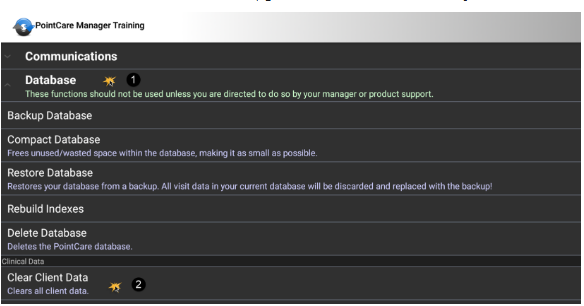
- Go to Database.
- Select Clear Client Data.
- Click Clear.
- Go back to the Maintenance Screen.
-
Complete a Sync.
📅 Effective: 11.06.2025 | 🛠️ Revised: 10.27.2026 | ✅ Approved: JS