
F-12-137 Update Visit Times on Accepted Visits
👤 RESPONSIBLE POSITION | ROLE
Unlicensed Field Staff (Home Health Aides & Homemakers)
🎯 PURPOSE
If a visit Start and/or End time is changed in the back office on an aide visit after it is already on the device, the time change is not reflected accurately on the PointCare device after a sync.
If Staffing Manager/designee makes a change to the aide visit time, complete the following steps to update the visit time.
🔄 PROCESS
- The office will contact the HHA/HMK (via phone or alternative means) to discuss the time change.
- The office will ask the HHA/HMK to change the time manually on their Pointcare device.
- To change the time on the PointCare device before the start of the visit:
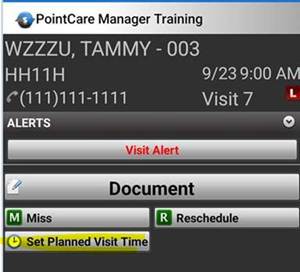
- Select the Client Visit where the time change has occurred.
-
Select Set Planned Visit Time.
-
Enter the new Start Time and End Time.
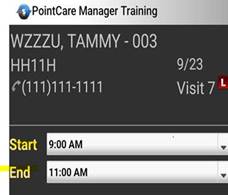
- Save the new time.
📅 Effective: 11.06.2025 | 🛠️ Revised: 10.27.2026 | ✅ Approved: JS