
F-5-318 Update Apps on Samsung Tablet
🎯 PURPOSE
Tablets should update automatically when connected to the internet if device is up-to-date and standard updates have been installed. If the application doesn’t update automatically, please follow the steps below.
🔄 PROCESS
- Pull down the notifications menu from the top of the device to see if there are any delayed or pending updates. Install updates if applicable.
- Power down the tablet.
- Turn tablet back on.
- Confirm power is at least 30%. If not, plug in device.
- Verify signal strength. If limited data connectivity, connect to WIFI.
- If the above steps still do not update the program when using battery or data, plug in device, connect to WIFI and restart the device again.
To check for updates manually:
-
Go to the Google Play Store:

-
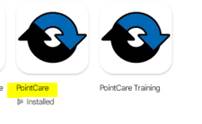
Select the appropriate application:
-
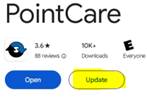
Select Update:

📅 Effective: 10.26.2026 | 🛠️ Revised: N/A | ✅ Approved: JS