
F-12-126 View Client Calendar
🎯 PURPOSE
This process details the information available within the Client Calendar view in PointCare. The client calendar can be accessed from the Medical Record and is linked to the Client Snapshot.
🔄 PROCESS
-
Select Calendar:

-
Current episode dates are located at the top:

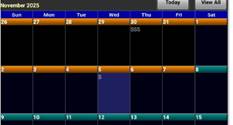
- Client’s 30 day billing periods are differentiated by color on the calendar:
-
Example: 1st 30 day period = 10/9-11/7, 2nd 30 day period= 11/8-12/7
-
- Swipe left or right to view full period.
-
Letters within the calendar indicate visits are scheduled/completed:

-
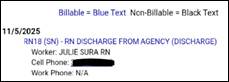
Select the date to view visits assigned on that day:
-
Select Today to move schedule back to today’s date:

-
Select View All to view all visits completed and scheduled. Visit information indicates clinician and contact information:



📅 Effective: 11.06.2025 | 🛠️ Revised: 10.16.2026 | ✅ Approved: JS