
F-12-118 Reschedule Visit - Licensed Staff
👤 ROLE
Licensed Field Staff
🎯 PURPOSE
When a licensed field clinician needs to reschedule an assigned visit, the steps of this process must be completed to reschedule the visit in PointCare.
Current and future visits may be rescheduled if clinician knows in advance that they cannot be performed on the originally scheduled date. This includes moving a future scheduled visit back to today. Clinicians may adjust the date of the visit within the current week, but cannot change the service code or clinician.
Subsequent Visits (11, 10) and other defined service codes may be rapid rescheduled from the device by qualified clinicians. When Reschedule is selected on other service codes, the visit will go back to the office to be processed by the Staffing Manager.
🔄 PROCESS
- In PointCare, select the assigned visit which needs to be rescheduled. The following options will appear depending on the status of the visit:
-
If the visit is in Accepted status:
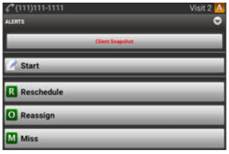
-
If the visit is in Pending status for the current day:
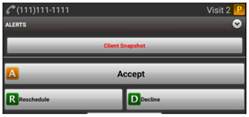
-
If the visit is pending for a future date in the rolling calendar:
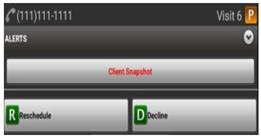
-
- Select Reschedule, which will prompt the worker to move the service code to a different date within the current week.
-
Prior to selecting new visit date, select View Calendar to view other scheduled visits for the client to avoid schedule conflicts.
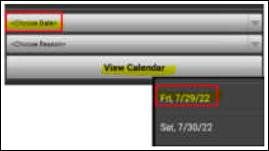
- Select Choose Date and select a date from the drop down to move the visit.
-
Select Choose Reason to enter the reason for the rescheduled visit.
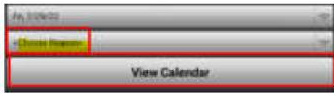
-
Select the best applicable reason from the options in the dropdown.
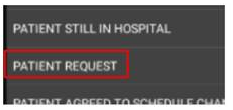
- Select SAVE to save the reschedule request.
- To Rapid Reschedule the visit, complete the following:
- After saving the reschedule request as above, sync twice immediately (back to back with no pause in between) and the visit will get updated back to the device.
- If the visit does not show back up on the device, the clinician must follow up with the office if visit is being rescheduled to that same day. Once the office processes the visit, the visit will show on the rolling calendar on next sync.
📅 Effective: 08.17.2026 | 🛠️ Revised: N/A | ✅ Approved: JFJ